线程间通信&资源共享
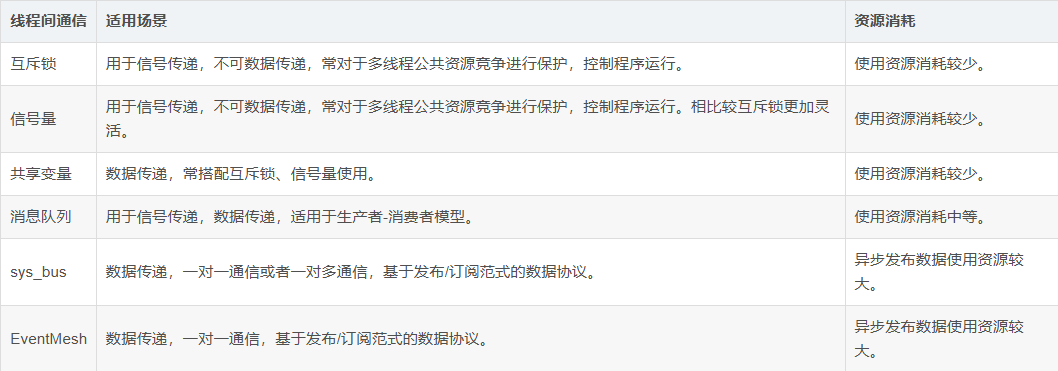
线程间通信指至少两个进程或线程间传送数据或信号的一些技术或方法。在多线程中使用中,线程间通信必不可少,通过线程间通信控制线程运行,共享资源控制、消息传递等,实现程序的多样化。
互斥锁 - 线程间通信&资源共享
互斥锁是一种用于多线程编程中,防止两条线程同时对同一公共资源(比如全局变量)进行读写的机制。互斥锁目的通过将代码切片成一个一个的临界区域,以达到对临界区域保护作用,使得多线程能够顺序访问。
# 该示例线程 B 一定条件下通过互斥锁控制线程 A 运行,达到线程间通信目的。
import _thread
import utime

lock = _thread.allocate_lock()
count = 1

# 线程 B 函数入口,通过锁控制,防止同时操作操作全局变量count。
def thread_entry_B(id):
    global count
    while True:
      with lock:
            print( 'thread {} count {}.'.format(id, count))
            count += 1
            utime.sleep(1)

# 线程 A 函数入口,通过锁控制,防止同时操作操作全局变量count。
def thread_entry_A(id):
    global count
    while True:
        with lock:
            print('thread {} count {}.'.format(id, count))
            count += 1

# 创建线程
_thread.start_new_thread(thread_entry_A, ('A',))
_thread.start_new_thread(thread_entry_B, ('B',))
信号量 - 线程间通信&资源共享
信号量(英语:semaphore)又称为信号标,是一个同步对象,用于保持在 0 至指定最大值之间的一个计数值。当线程完成一次对该 semaphore 对象的等待时,该计数值减一;当线程完成一次对 semaphore 对象的释放时,计数值加一。
通过信号量的控制,以达到对多线程控制的目的,比如多线程对于资源操作的顺序或者执行有因果关系,必须通过一个线程先进行而后其他线程才能进行处理,可以通过信号量进行控制。
# 该示例线程 B 一定条件下通过信号量控制线程 A 运行,达到线程间通信目的。
import _thread
import utime

semphore = _thread.allocate_semphore(1)

# 线程 B 函数入口,通过信号量控制线程 A 运行。
def thread_entry_B(id):
    while True:
        print('this is thread {}.'.format(id))
        utime.sleep(1)
        semphore.release()

# 线程 A 函数入口,等待信号量运行。
def thread_entry_A(id):
    while True:
        semphore.acquire()
        print('this is thread {}.'.format(id))

# 创建线程
_thread.start_new_thread(thread_entry_A, ('A',))
_thread.start_new_thread(thread_entry_B, ('B',))
共享变量
共享变量指多个线程同时对同一个变量进行读写操作,并且这些操作都能够影响到其他线程。
在进行多线程编程时,使用共享变量,需要对共享变量进行合理的管理和控制,避免多线程竞态条件的出现。
# 该示例一个线程修改共享变量,一个线程读取,当存在多线程写入时,需要考虑变量安全,防止出现意外情况。
import _thread
import utime

lock = _thread.allocate_lock()
count = 1

# 线程 B 函数入口,共享变量 count 累增。
def thread_entry_B(id):
    global count
    while True:
        count += 1
        utime.sleep(1)

# 线程 A 函数入口,共享变量 count 读取打印。
def thread_entry_A(id):
    global count
    while True:
        print('thread {} current count is {}.'.format(id, count))
        utime.sleep(5)


# 创建线程
_thread.start_new_thread(thread_entry_A, ('A',))
_thread.start_new_thread(thread_entry_B, ('B',))
消息队列
消息队列实现了多生产者、多消费者队列。采用数据先进先出的数据结构,这特别适用于消息必须安全地在多线程间交换的线程编程。常用于消息异步处理,比如接收数据线程防止接收阻塞,只是对数据进行入栈存储,另一个线程专门处理消息队列消息。
# 该示例线程 B 通过将消息压栈,线程 A 专门读取消息队列的内容进行处理。
import _thread
import utime
from queue import Queue

q = Queue()

# 线程 B 函数入口,共享变量 count 累增。
def thread_entry_B(id):
    data = 'Hello QuecPython!'
    while True:
        q.put(data)
        print('thread {} send {}.'.format(id, data))
        utime.sleep(3)

# 线程 A 函数入口,共享变量 count 读取打印。
def thread_entry_A(id):
    while True:
        data = q.get()
        print('thread {} recv {}.'.format(id, data))

# 创建线程A、B。
_thread.start_new_thread(thread_entry_A, ('A',))
_thread.start_new_thread(thread_entry_B, ('B',))
sys_bus
sys_bus 组件用于消息的订阅和发布。在多线程中可用于,多个线程多个消息的解耦处理,通过定义不同的类型的 topic 用于处理不同的事务,任何线程可以随时通过 publish 来处理该消息。
该组件能够一对多或者多对多通信,即一个topic同时多个订阅者,发布到该topic的消息,所有订阅者均能处理。
# 该示例线程通过订阅 topic,A、B 线程分别向其订阅topic发送订阅消息处理。
import _thread
import utime
import sys_bus

def callback_A(topic, msg):
    print("topic = {} msg = {}".format(topic, msg))

def callback_B(topic, msg):
    print("topic = {} msg = {}".format(topic, msg))

# 线程 B 函数入口,订阅 sysbus/thread_B topic并定时3秒发送消息到sysbus/thread_A topic。
def thread_entry_B(id):
    sys_bus.subscribe("sysbus/thread_B", callback_B)
    while True:
        sys_bus.publish_sync("sysbus/thread_A", "this is thread B msg")
        utime.sleep(3)

#线程 A 函数入口,订阅 sysbus/thread_A topic并定时3秒发送消息到sysbus/thread_B topic。
def thread_entry_A(id):
    sys_bus.subscribe("sysbus/thread_A", callback_A)
    while True:
        sys_bus.publish_sync("sysbus/thread_B", "this is thread A msg")
        utime.sleep(3)

# 创建线程A、B。
_thread.start_new_thread(thread_entry_A, ('A',))
_thread.start_new_thread(thread_entry_B, ('B',))
# 该示例线程 A、B 通过订阅同一 topic,实现一对多进行通信,其他线程发布消息到该topic,A、B线程均收到内容。
import _thread
import utime
import sys_bus

def callback_A(topic, msg):
    print("callback_A topic = {} msg = {}".format(topic, msg))

def callback_B(topic, msg):
    print("callback_B topic = {} msg = {}".format(topic, msg))

# 线程 B 函数入口,订阅 sysbus/multithread topic。
def thread_entry_B(id):
    sys_bus.subscribe("sysbus/multithread", callback_B)
    while True:
        utime.sleep(10)

# 线程 A 函数入口,订阅 sysbus/multithread topic。
def thread_entry_A(id):
    sys_bus.subscribe("sysbus/multithread", callback_A)
    while True:
        utime.sleep(10)

# 创建线程A、B。
_thread.start_new_thread(thread_entry_A, ('A',))
_thread.start_new_thread(thread_entry_B, ('B',))

# 主线程间隔3秒发布消息到 sysbus/multithread topic。
while True:
    sys_bus.publish_sync("sysbus/multithread", "sysbus broadcast conntent!")
    utime.sleep(3)
EventMesh
EventMesh 组件用于消息的订阅和发布。在多线程中可用于,多个线程多个消息的解耦处理,通过定义不同的类型的 topic 用于处理不同的事务,任何线程可以随时通过 publish 来处理该消息。
该组件只能一对一或者多对一通信,即一个topic同时只能一个订阅者,最后一个订阅的会挤掉其他订阅者。
点此在 github 中下载 EventMesh 组件代码。
# 该示例线程通过订阅 topic,A、B 线程分别向其订阅 topic 发送订阅消息处理。
import _thread
import utime
from usr import EventMesh

def callback_A(topic, msg):
    print("topic = {} msg = {}".format(topic, msg))

def callback_B(topic, msg):
    print("topic = {} msg = {}".format(topic, msg))

# 线程 B 函数入口,订阅 EventMesh/thread_B topic并定时3秒发送消息到EventMesh/thread_A topic。
def thread_entry_B(id):
    EventMesh.subscribe("EventMesh/thread_B", callback_B)
    while True:
        EventMesh.publish_sync("EventMesh/thread_A", "this is thread B msg")
        utime.sleep(3)

# 线程 A 函数入口,订阅 EventMesh/thread_A topic并定时3秒发送消息到EventMesh/thread_B topic。
def thread_entry_A(id):
    EventMesh.subscribe("EventMesh/thread_A", callback_A)
    while True:
        EventMesh.publish_sync("EventMesh/thread_B", "this is thread A msg")
        utime.sleep(3)

# 创建线程A、B。
_thread.start_new_thread(thread_entry_A, ('A',))
_thread.start_new_thread(thread_entry_B, ('B',))
# 该示例线程 A、B 通过订阅同一 topic,EventMesh 一个 topic 只能一个订阅,B 最后订阅,会直接挤掉 A 的订阅,只有 B 线程能收到该topic的消息

import _thread
import utime
from usr import EventMesh

def callback_A(topic, msg):
    print("callback_A topic = {} msg = {}".format(topic, msg))

def callback_B(topic, msg):
    print("callback_B topic = {} msg = {}".format(topic, msg))

# 线程 B 函数入口,订阅 EventMesh/multithread topic。
def thread_entry_B(id):
    EventMesh.subscribe("EventMesh/multithread", callback_B)
    while True:
        utime.sleep(10)

# 线程 A 函数入口,订阅 EventMesh/multithread topic。
def thread_entry_A(id):
    EventMesh.subscribe("sysbus/multithread", callback_A)
    while True:
        utime.sleep(10)

# 创建线程A、B。
_thread.start_new_thread(thread_entry_A, ('A',))
_thread.start_new_thread(thread_entry_B, ('B',))

# 主线程间隔3秒发布消息到 EventMesh/multithread topic。
while True:
    EventMesh.publish_sync("EventMesh/multithread", "EventMesh broadcast conntent!")
    utime.sleep(3)